

This tutorial is about this design. Its based on all swish2. There are many methods used in this that I'll explain you one by one with images but if you will make this design in AbodobePhotoShop then it'll take some time to make it smooth but in swish2 you will simply follow the few methods.So lets get started. Remember that red line represents method, blue line represents method's sequence and green line represents link between two or up to two tools.
Design:
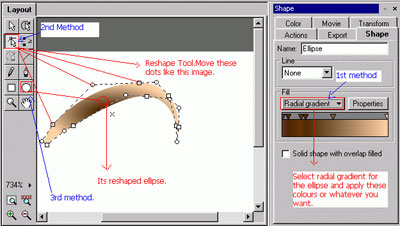
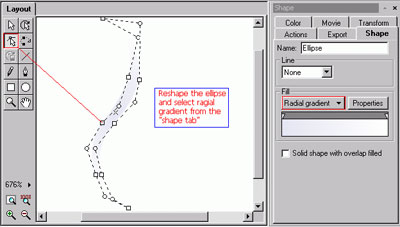
1. Draw an ellipse and select the tool "reshape".
2. Move the dots like in this image and follow them.
3. Select the "Radial Gradient" from the "shape" tab.
4. Apply these colours which are applied in the image and don't forget their sequence.
Embossed:
1. Draw an ellipse like I made in this image.
2. Go into "colour" tab and select "Custom""Alpha" also choose "Advanced".Put 50% in this box. Like this.
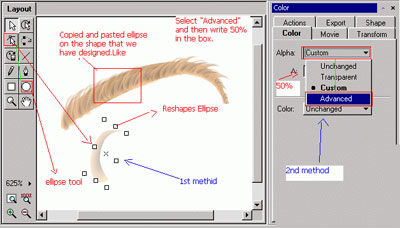
3. Make many ellipse by copying this ellipse and pasting it in scene.
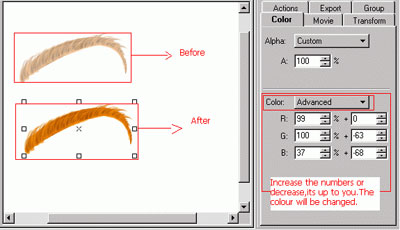
4. Now group them all and go into "colour" tab. Select "Advanced", now decrease numbers from the boxes or increase by following it the whole colour of a group will be changed.
Grouping:
1. Copy the shape that we have recently made and paste it in the scene.
2. Apply the same method that we have applied on the previous shape.Make it a little big.
Follow the image:
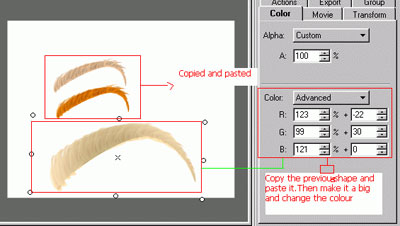
3. Make many groups like the previous one but their directions must be different, after this method make more groups like this group and paste them in the scene but change their colours by going into"shape" tab,selecting "colour" and choosing"advanced"(increase and decrease the numbers of the boxes).Follow the image:-
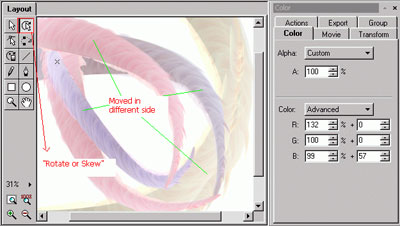
The section of tubes is complete!
Background:
1. First change the movie background colour and select BLACK colour.
2. Draw an ellipse and reshape, also select the colour according to this image:-
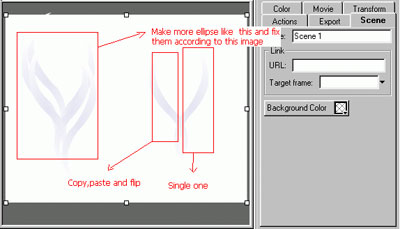
3. Copy this ellipse that we have recently made and paste it.Now flip it and make more like these two ellipses. Follow the image:-
4. Draw a rectangle and select"linear gradient" from the "shape". Reshape it.Then move its shadow according to the image.
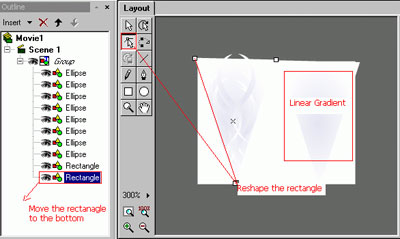
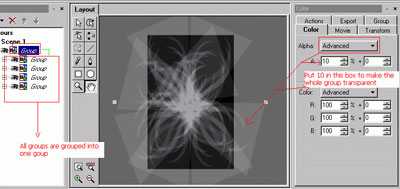
5. Group this rectangle+ellipses,copy and paste it in the scene. Again copy this whole group and make 5 groups in the scnene.Now group them all and go to its "colour""Alpha" tab,select "advanced" and put 10% in this box. Follow the image:-
This section is complete!
Combine Them:
1. Copy the whole background that we have recently make and also copy the design of tubes. Paste them both in one movie.But background must be under the design.
You will get the following result:
