


Example:
Use the example above to see how custom cursors can work.
Custom cursors a surprising simple to create and add a great effect to a website.
Step. 1
First of all create your custom cursor,a simple way is to select the arrow tool from within SwishMax and create a simple cursor to start with like Fig.1
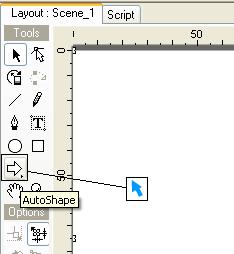
Fig.1
Step. 2
When you are happy with your cursor, group it as a sprite, give it the name "Custom - Cursor" and add the following code to the sprite.
|
onLoad () {
mouse.hide(); startDragLocked(); } |
That's it now press Ctrl+T to test it out.
