


Step1:
Create a new Flash Document with the dimension 550 as the width and 400 pixels as the height, set the background color to white.
Click on the Oval Tool
 and create a small oval shape. Something like the image below.

Click on the Selection Tool
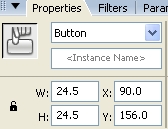
 right click on the circle and convert to symbol Button. Press Ctrl+F3 this will bring up the properties window shown below. Change the Instance Name to Drag, this is important.
Step2:
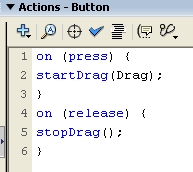
Click on the circle and press F9, this will bring up the Action window. Enter the script below in the Action window
| startDrag(Drag); } on (release) { stopDrag(); } |
Below is a screenshot of how the Script looks in the Action window.
That is it, test your movie and it should work. Hope it came out to what you expected.
Click on the ball and drag it.
