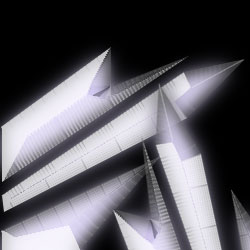
Step 1.
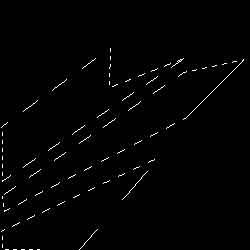
Create a new 400X400 pixels document with the black background. Choose the Polygonal Lasso Tool and make selections (holding Shift) like shown in the pic.1.
Step 2.
Create a new layer (Ctrl+Shift+N) and fill the selection (apply Edit > Fill) by the dark color (R:10 G:0 B:95). Apply Select > Modify > Contract with the following settings: Contract By->5 pixels. Now apply Select > Feather with the following settings: Feather Radius->5 pixels. Fill the selection (apply Edit > Fill) by the light color(R:220 G:210 B:250). Apply Select > Deselect (Ctrl+D).

Step 3.
Duplicate this layer (Layer 1 copy) and apply Filter > Blur > Gaussian Blur with the following settings: Radius->9 pixels. Drag "Layer 1 copy" under the "Layer 1".
Step 4.
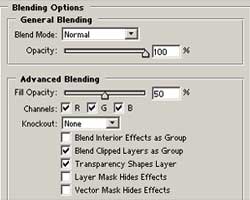
Go to "Layer 1" and apply Layer > Layer Style > Blending Options with the following settings:
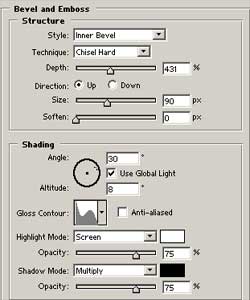
and then Bevel & Emboss with the following settings:
Step 5.
Now press Ctrl+E and then duplicate the layer. Apply Edit > Free Transform (Ctrl+T) and turn the layer. And that's it.