


1. Open a 500*200 document.
2. Go Filter> Render> Clouds
3. Go Filter> Render> Different Clouds
4. Go Filter> Blur> Radial Blur (Amount: 50 Blur Method: Zoom Quality: Good)
5. Go Filter> Distort> Polar Coordinates (Rectangular to Polar)
6. Put a lens flare in the middle Filter> Render> Lens Flare (Brightness: 100% Lens Type: 105mm Prime)
7. Go Filter> Render> Lighting Effects
Use these settings:
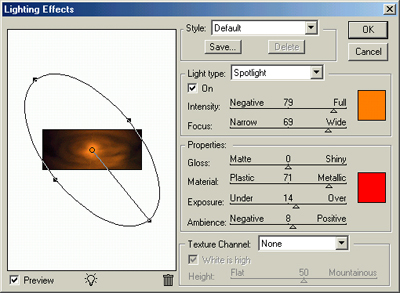
Click to enlarge
And this is the final touch.

Click to enlarge
