Create a new file in photoshop. Set your background and foreground colors to #C40202 and #FFF600. Use Filter->Render->Cloud.

Repeat the same step on a new layer but use the plaster effect at Filter->Sketch-> Plaster.
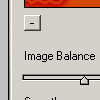
Use these settings:
Image balance: 20
Smoothness: 20
Light direction: top

Set the layer to screen and done! Here's my result