Start with a new document, it doesn't have to be very large.
Make a new layer and call it: "white". Make a selection of 150px X 25px. Fill it with white and give it a 1px black stroke.
You should now have this(the green is my background color):

Ctrl + click the "white" layer. Go to select > modify > contract in the new window, fill in "1" and hit ok. Make a New layer, called: "Gradient". Set your foreground color to #FDC303 and your background color to #FD8D03. And draw a gradient from the top to the bottom of your selection. Give this layer a 1px black stroke
You should now have this:

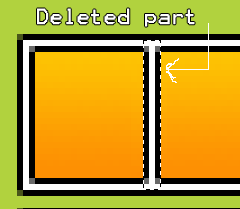
Looking cool already huh? :D zoom in a couple of times and make a selection of 3px X 25px. Delete a small piece of the "Gradient" layer, like this:
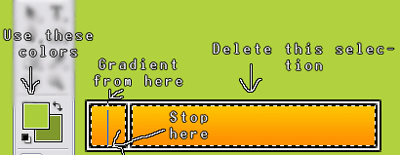
Ok, now CTRL + click your "Gradient" layer. Delete the big part of the selection and draw a gradient from top to bottom with foreground color: #AACE3C and background: #7D982D:
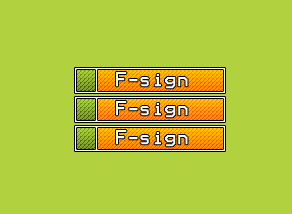
That's practically it. Add some text and apply another 1px black stroke. You could also apply a pattern to it. Here is my result: