In honor of Valentine's Day - I wanted to offer a photoshop tutorial on making a cute and girly - love heart header.
1. Find a good heart image or use the pen tool to create something like this.

2. Apply these layer styles to it.
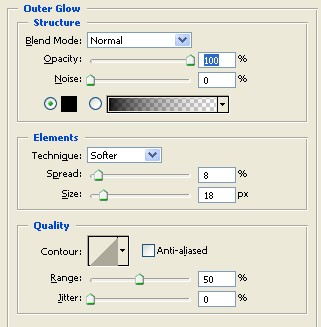
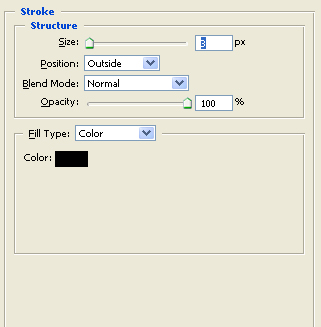

3. Use the rectangular marquee tool to add different strips of a variety of shades of pink and purple to the background.

4. Now add small versions of the heart in step 1 except make them a light gray. Scatter them randomly throughout.

5. Now add the navigation to the left hand side. We used a dark gray color and the font impact.

6. Repeat step 5, except with white font. Nudge the layer down and to the right two pixels to get a shadow effect. And your navigation menu is all complete!