

1. Open a new document by clicking on File -> New.
2. Give first layer the name of 'Sun' and place a circle at the center of the screen compose of black and yellow gradient. (You can make your gradient by opening Color Mixer from window -> Color Mixer). Lock this layer.
3. Inset a new layer for Mercury and add motion guide to this layer.
4. Click of motion guide layer and grad a circle tool but set its fill to transparent and stroke to gray. Lock this layer.
5. Now on Mercury layer place a circle filled with Orange and black linear gradient.
6. Create motion tween and on frame 20 press f6 and move the circle slightly less than half of the circumference as shown in fig M.S.1.
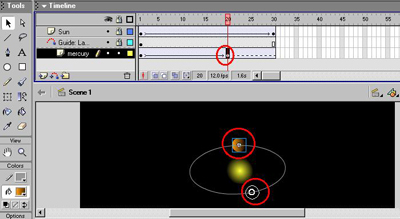
7. On frame 30 press f6 again and drag and move circle to less than 3 quarter of the circumference.
8. On frame 40 again press f5 and move circle to the initial position.
9. Insert another layer with the name 'Mercury Path'. Click the guide layer and and copy the ellipse, click Mercury Path and paste in place the copied ellipse.
10. Hide Motion Guide. Repeat the steps to complete the solar system.
You can download source file here.
