Her

Home Photoshop Tutorials Photo Editing Placing a Person Inside a Picture in Photoshop

Placing a Person Inside a Picture in Photoshop

Author: Colin Smith Author's URL: www.planetphotoshop.com More by this author

In this tutorial I will demonstrate how to place a person inside an image using the "paste into" command.
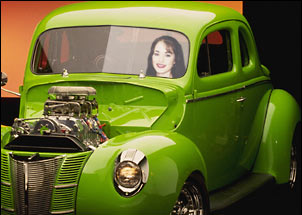
image 1

You can use this technique to achieve all kinds of convincing photomanipulation tricks.

To start with you will need 2 pictures.

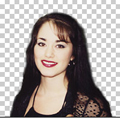
I chose a picture of a hot rod and a person

image 2

image 3

Using the pen tool draw a loose path around the window.
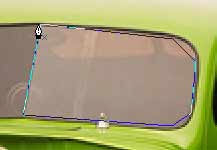
image 4

Now switch to the "add anchor point" path tool image 5

Drag the anchor points into place.

To add a curve: Click once on the midway point between 2 anchor points, release the mouse button, then click and drag, you will notice you are now creating a curve. That is the biggest secret to the path tool. A bit of practice and it will be a breeze.
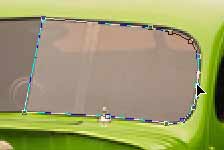
image 6

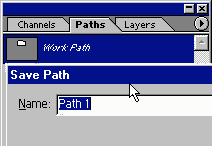
Once you have created the path, go to the paths palette and click, save path.

Now we want to load the path as a selection.

To do this just ctrl/cmd+click on the paths thumbnail

image 7

image 8

You now will have a selection around the area we are going to position the person.
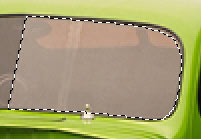
image 9

Select the person in the 2nd image and choose "copy"
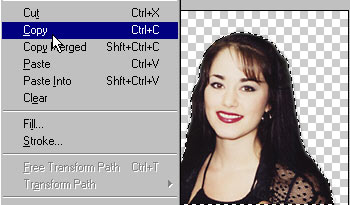
image 10

Select the hotrod image again and choose edit>paste into

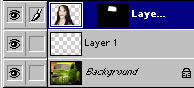
You will notice a new layer is created with a layer mask around the window.

image 11

image 12

Press Ctrl/Cmd+T for free transform and scale and position your person to fit inside the window.
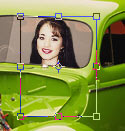
image 13

There all nicely positioned and sized in the window.

The only problem now is that it looks a bit fake because the window has a highlight and the person is opaque.
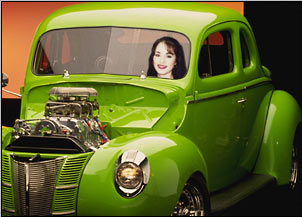
image 14

Lets create a highlight for the window. Load the path of the window shape create a new layer. Fill with white
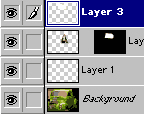
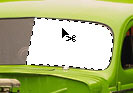
image 15

image 16

Now switch to screen mode and lower the opacity to 29%

image 17

There all done. Wanna take a ride?

Don't limit this techniques for people and windows, use it for all kinds of photo foolery and collaging.


Placing a Person Inside a Picture in Photoshop


About the Author:

Click to Visit Author's Website

Colin Smith is a best-selling author, trainer, and award-winning new-media designer who has caused a stir in the design community with his stunning photorealistic illustrations composed entirely in Photoshop. He is founder of the world's most popular Photoshop resource site, PhotoshopCAFE.com, which boasts more than two million visitors.

With over 10 years of experience in the design industry, Colin was formerly Senior Editor and Art Director for VOICE magazine. He is a regular columnist for Photoshop User magazine, PlanetPhotoshop.com, and the official site of the National Association for Photoshop Professionals. He also contributes to a number of other graphic art publications and Web sites, such as Mac Design magazine, Web Designer magazine and Computer Arts Magazine.

Colin's graphic design work has been recognized with numerous awards, including the Guru awards at Photoshop World 2001 and 2002, for his work in both Illustration and Web Design. He's authored or co-authored more than ten books on Photoshop, including the best-selling How to Do Everything with Photoshop CS (McGraw-Hill/Osborne, 2003) and award-winning Photoshop Most Wanted: Effects and Design Tips (A Press/Friends Of Ed, 2002). Colin is also creator of the Photoshop Secrets Video training series (PhotoshopCD.com). He is in high demand across the United States as a lecturer, presenting his Photoshop techniques to Web designers and other graphics professionals across the nation.