Draw this shape with Ellipse tool :

Apply these layer styles in it:
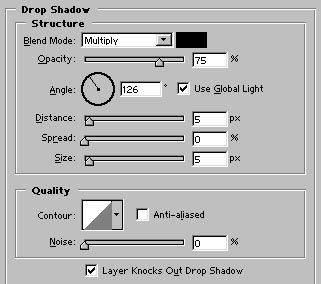
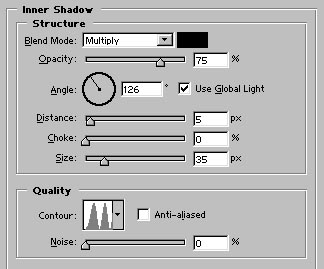
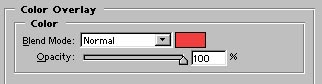
Image after applying above layer styles :

Now, with the help of pen tool draw this path :

Adjust the nodes as shown:
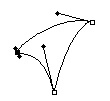
Press control+Enter and fill the path after creating new layer with any color of your choice.

Apply these layer styles in it :
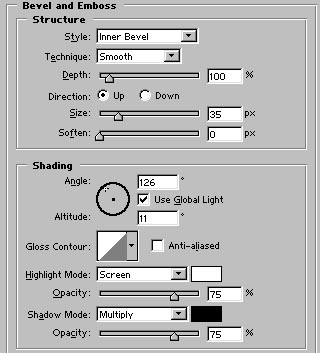
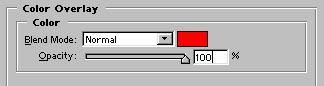
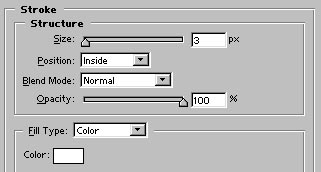
Image after applying above layer styles :

Duplicate and arrange this layer as shown:

Now, draw this small circle with Ellipse tool:

Apply these layer styles in it :
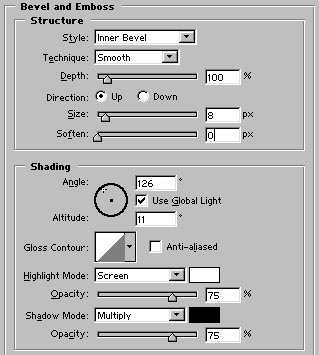
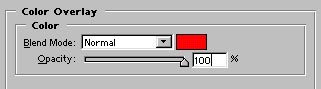
Image after applying above layer styles :

Duplicate and arrange this circle as shown:

Finally, add the company name in it. Our logo is ready :)