

Open a new file that would have 1280x1024 px and 72 dpi. Then make use of this tool
 to create the primary background's layer of the picture to be next.

Blending Options-Gradient Overlay
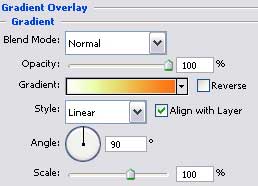
Gradient's parameters:
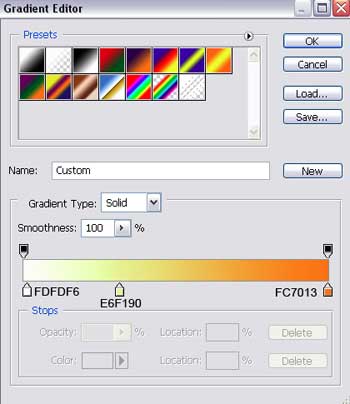
The next instrument
 will be helpful in drawing a circle on our picture.


Fill 0% on the layers.
Blending Options-Stroke
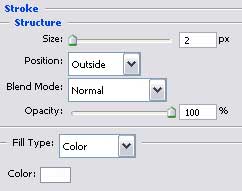
Make thirty copies of the recently made layer and apply the Free Transform selection to minimize the copies or to enlarge them. Place them the way it is shown on the picture.

Select the next tool
 to represent a part of the ornament we want to fill the picture with. It must have the next color - FF7E00.

Using the same instrument, represent one more ornament's element, colored this time in FF9B39.
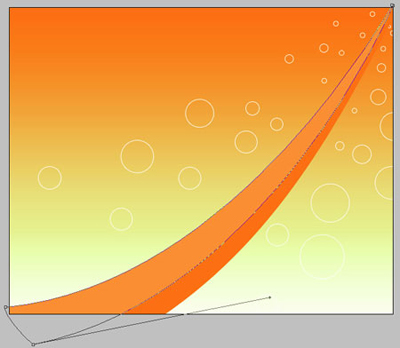
Choose the last applied instrument
and try to represent a thin stripe having the next color - FFB772.


Choose a different tool
 now that will be helpful in selecting the cliche of butterfly shape we need from the table below.
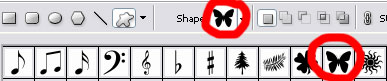
Represent a butterfly colored in F6550F that must be turned over, applying Free Transform selection.


Copy this new made layer sixty times. Using the Free Transform selection, it's possible to change the parameters of the copies. Turn them over on a certain angle.

Create now thirty-six copies of the same butterfly, colored with F9D39A. Select again the Free Transform option to correct the copies' sizes and their level of turning.

Create now fifty-seven copies of the butterfly, colored this time in F4A44 and apply the same Free Transform option for the same operation we did earlier.

Using the same method, represent now thirty-nine copies of the mentioned butterfly and color them out in DE7219.

On the last stage, we have to represent 15 copies of the same butterfly, colored with F1CA73. The Free Transform option will help us to make the corrections on the sizes and their placement.

The illustration is finished!
