We'll begin this tutorial, by selecting the "Pen Tool" and creating the below shape. Use White as the color.

Now you can right click on the shape layer and select, "Blending Options...". Go ahead and click on "Outer Glow."
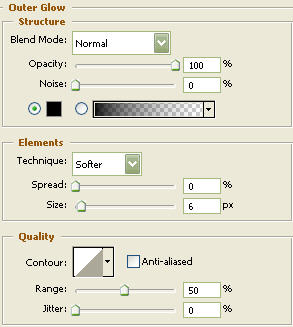
Do not click OK yet... still more to do
Now click on "Inner Glow."
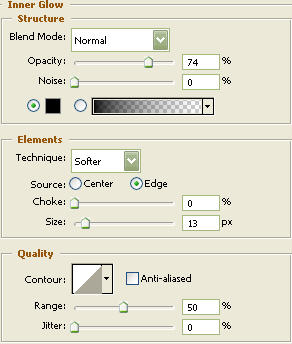
Do not click OK yet... still more to do
Now click on "Color Overlay"
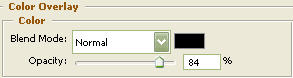
You may now click "OK"
You should now have the below image.

Select the "Rounded Rectangle Tool" again and draw a rectangle as illustrated below with a radius of 100 pixels. Color doesn't matter.

Now you can right click on the shape layer and select, "Blending Options...". Go ahead and click on "Outer Glow."
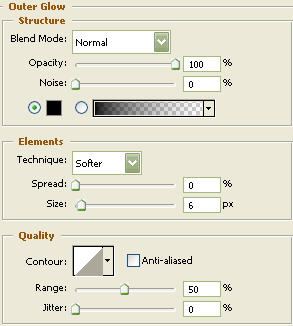
Do not click OK yet... still more to do
Now click on "Inner Glow."
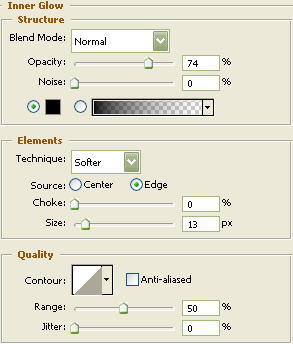
Do not click OK yet... still more to do
Now click "Color Overlay."
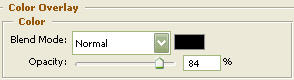
Do not click OK yet... still more to do
Now click on "Stroke."
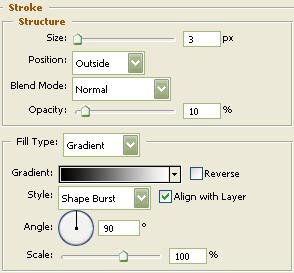
You may now click OK.
You should now have the below image.

Now select the "Elipse Tool" and draw a circle. Use White as the color. You should now have the below image.

Right click on the circle layer and select, "Blending Options...". Go ahead and click on "Drop Shadow."
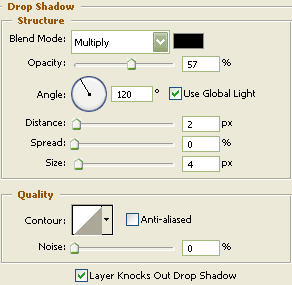
Do not click OK yet... still more to do
Click on "Inner Glow."
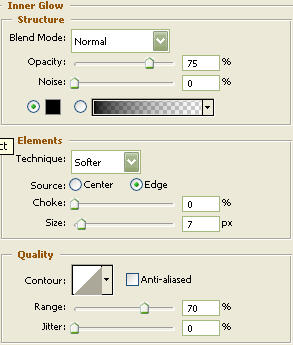
Do not click OK yet... still more to do.
Click on "Bevel and Emboss."
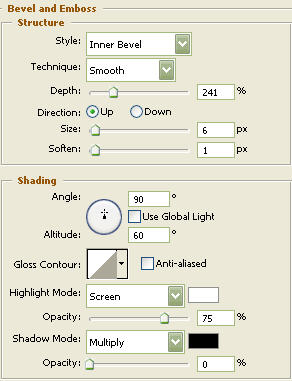
Do not click OK yet... still more to do
Click on "Gradient Overlay."
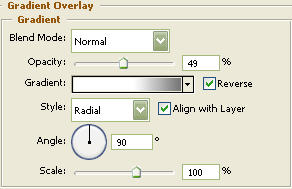

Do not click OK yet... still more to do
Click on "Stroke."
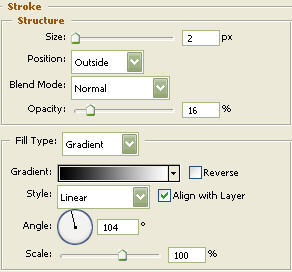
You may now click OK.
You should now have the below image.

Duplicate the circle layer and move to the appropriate spot as illustrated below.

The Results!!!
Create some media icons and place on the buttons as I have done below. I hope you enjoyed this tutorial.