

Create a document in Flash.
Prepare an initial picture with the width and length 2-5 pixels larger the document size.
Import the picture to the library.
Create a movie clip "water_mc".
Place the picture to the layer 1, coordinates X=0 Y=0 of this movie clip.
Then place the picture to the layer 2, coordinates X=0 Y=1 of the movie clip.
Create a mask on the layer 3.
The mask has a wavy texture.
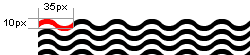
To make the water move, shift the mask 10px up or down in the last frame. Set tween motion.
A looped motion of the mask makes the waves move smoothly.
Set transparency to the picture in the layer 2 to make the water look more realistic.
To imitate flowing water, shift the mask 35px to the left or to the right in the last frame.
Don’t be afraid to experiment!
You can animate a logo: insert it in the movie clip to get a logo swaying in the water.
Download source (.FLA format) here.
