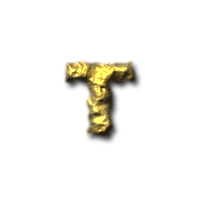
1. Make a new document. Select the Type Tool and put in a nice BOLD word. I used ARIAL font.

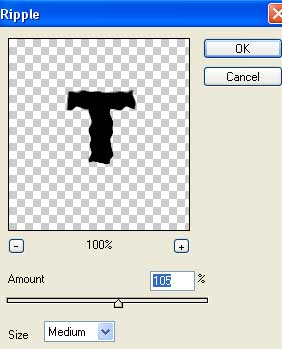
2. Now go to Filter>Distort>Ripple. It will ask you rasterize the layer before continuing so just press OK to that and add these ripple numbers:
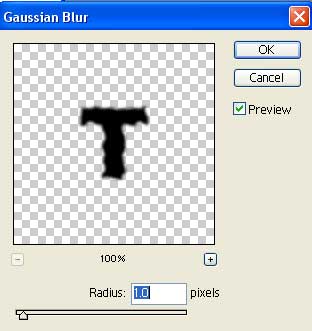
Ok, so now go to Filter>Blur>Gaussian Blur and use the the following settings:
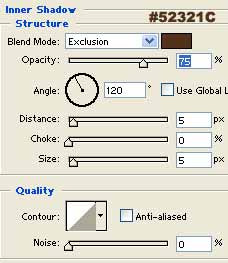
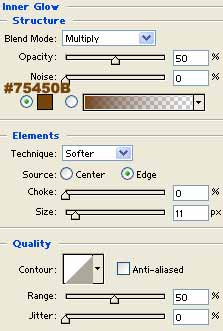
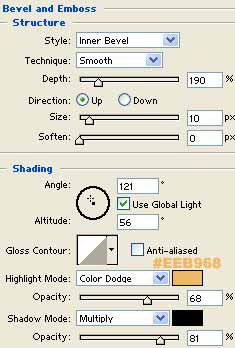
3. Now here comes the fun part. Lets make some gold!! Ok right click the text layer. Go to Blending Options and apply all settings as seen below!
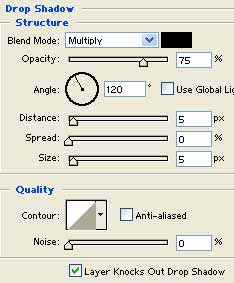
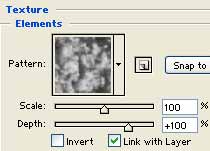
I used the cloud texture.
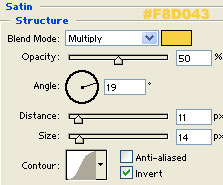
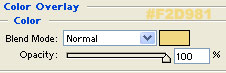
Finito! Enjoy the gold nugget text effect!