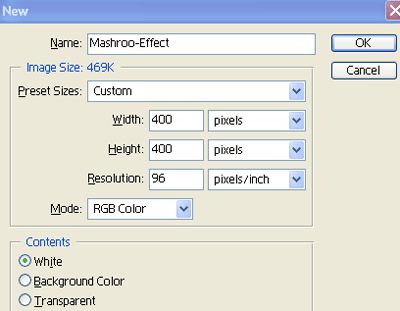
1. First of all open new document of Custom size Height & Width 400x400 pixels, Resolution 96 and Mode RGB Color As shown below
2. Now select these
 colours for Foreground & Background and Fill green color by the Press Ctrl+Backspace
3. Now select Text Tool
 and write words as shown below

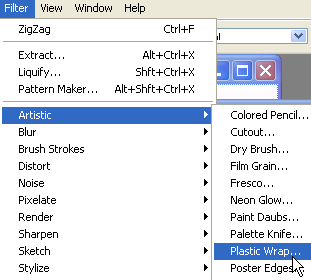
4. Now Go to Filter>Artistic>Plastic Wrap as shown below
5. Now apply the following settings
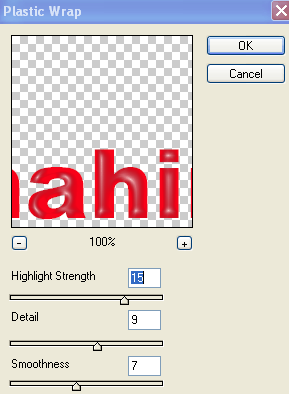
6. Now your Text will be look as shown below

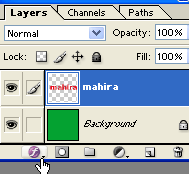
7. Now select Text Layer and click on 'f ' which is indicating by finger sign as shown below
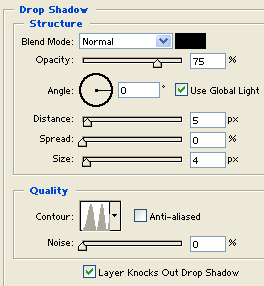
8. Now select Drop Shadow and apply the following settings
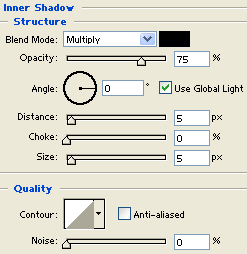
9. Now select Inner Shadow and use the following settings
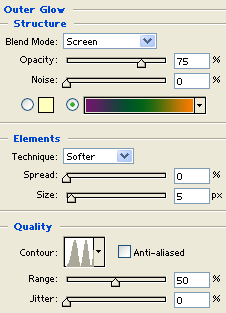
10. Now select Outer Glow and apply the following settings
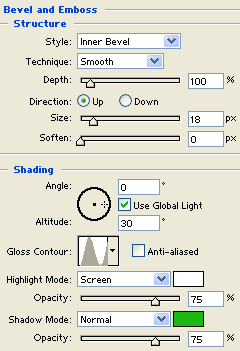
11. Now select Bevel & Emboss and apply the following settings
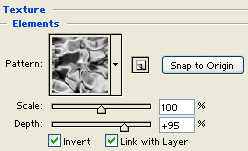
12. Now select Texture Elements and apply the following settings
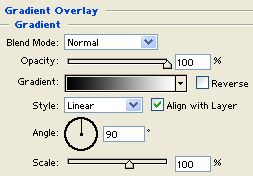
13. Now select Gradient Overlay and use the following settings
14. After used the above settings your Final Text will be look as shown below