1. Type the text in white color on the dark background.

2. Filter > Render > Lighting Effects
(Click OK when asked for Rasterizing the Type)
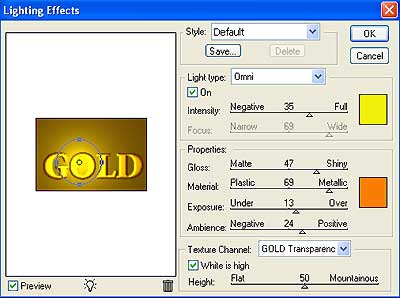
3. Make the changes in the "Lighting Effects" dialogue box as per following figure.
Change the palette colors properly to Yellow and Orange as per shown in the figure.
Please do not forget to change the Texture Channel to Transparency.
4. You get the following effect.