1. Type the text and fill with the color of your choice.

2. Filter > Noise > Add Noise
(Amount: 7, Uniform, Monochromatic)
Say OK when asked for Rasterizing the type.

3. Filter > Distort > Ocean Ripple
(Ripple Size: 9, Ripple Magnitude: 9)

4. Layer > Layer Style > Bevel and Emboss
Change the Gloss Contour to Ring
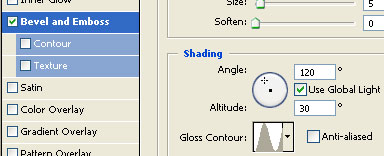
Select Drop Shadow also