


Step 1
Open an image for editing that you feel needs adjusted or just for practicing with the curves utility. The strength of this fantastic tool comes in it's ability to correct over exposure, and under exposure photographs. I will be working with this photograph throughout this tutorial, which is available in the download pack for this tutorial:

Step 2
In the layer window press the button that says: create new fill/adjustments layer. from there choose "Curves"
Alternatively you may press Ctrl + M on your keyboard to open up the "Curves Tool"
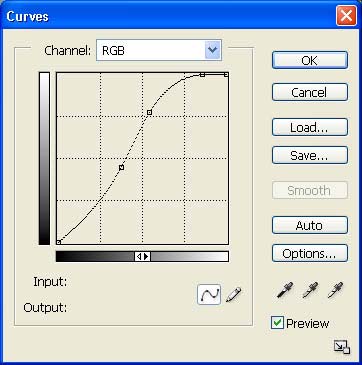
Step 3
Make the settings as the above picture to make your picture lighter, Then press OK.
Result:

Step 4
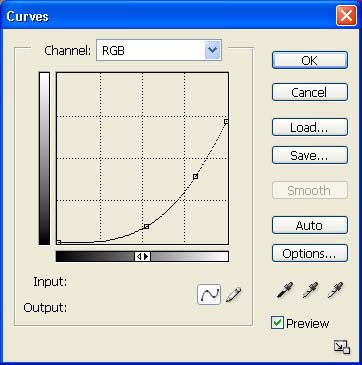
Here is another result with slightly different settings

The key to mastering the Curves tool is experimentation. This powerful photoshop utility is a staple of any graphic designers everyday life. Learn to use this tool, and utilize it to it's full potential.
