1. Open a file that you want to add snow.
Since the snow effect looks like cartoon, it is better to add it to cartoon picture.
2. Lasso Tool (L). If your 'Lasso Tool' is not showing 'Lasso Tool', click and hold on the tool until it shows 'Lasso Tool'.
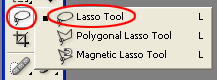
3. Select the part you want to add snow. Usually on the top of the tree or on the bottom.

4. Create new layer (CTRL + SHIFT + N) and named it Snow.
5. 'Select > Modify > Smooth'. Enter 4 pixel.
6. In the Snow layer, fill the selection with White color (SHIFT + F5).

7. Deselect the selection (CTRL + D).
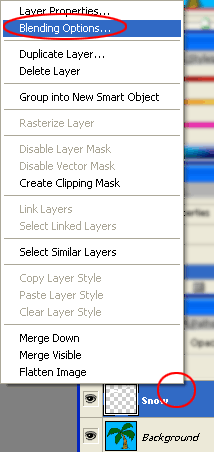
8. Select the Snow layer and right click on it to choose 'Blending Options'
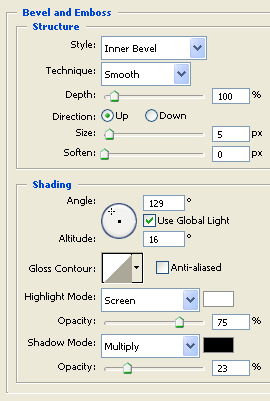
9. Apply 'Bevel and Emboss' with this setting:
10. Save the file.