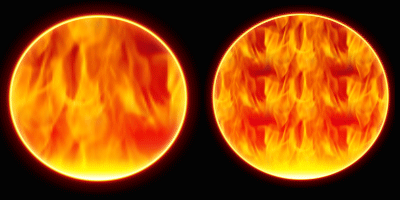
Before starting this tutorial you will have to define the pattern that you will be using for your image in blending options. To do that; save any one of the two patterns(images) below and open it in photoshop. now with the document active go to File > Define pattern and select the name you want to give this patter. (pretty easy)


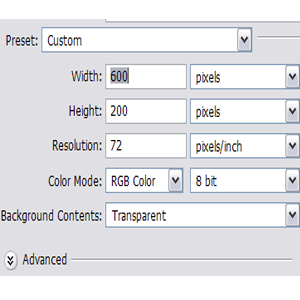
1. Click New in the File menu and create a new Photoshop document with values as shown in the image below (Ctrl+N).
2. Using the Paint bucket tool paint the layer with With Black Color (#000000).
3. Select the Text Tool (Horizontal Type) from the Tool Box window and write the text of your choice on the layer we just created. Try using some Liquid/Fluid kinda font. I used a font named "Croobie". I used the color White (#FFFFFF).
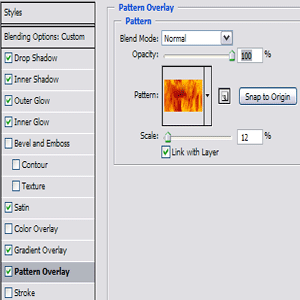
4. Now coming to the most important part, Blending Options. Right click the text layer you just created in the Layer Window and click Blending Option.
Blending Options:
Drop Shadow: Color used for blend mode: #FFFFDC
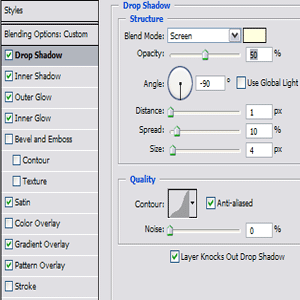
Inner Shadow: Color code used for blend mode : #FFFFA1
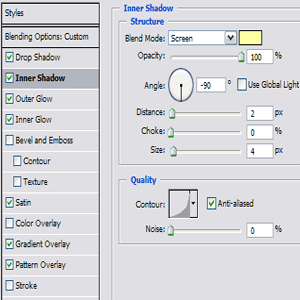
Outer Glow: Use any color combination for blend mode. Even a combination of blue and yellow looks pretty cool. I used a custom color combination of a couple of light colors.
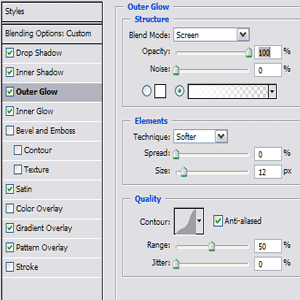
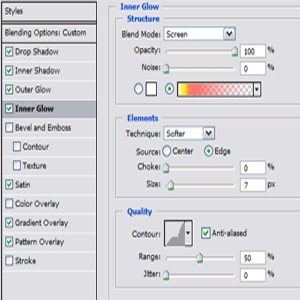
Inner Glow: Use nearly same color combination as used above for blend mode option.
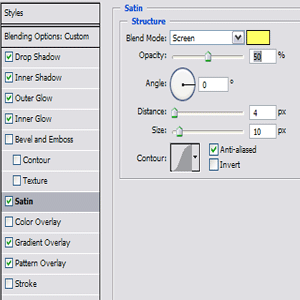
Satin: Color code used for blend mode: #FFFF64
Gradient Overlay: Details for colors have been shown in the images below. In case you wish to use some other colors, then go for only bright colors.
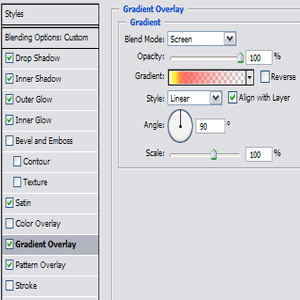
Gradient Details:
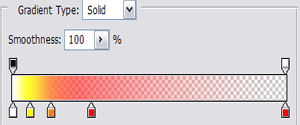
Pattern Overlay: Select the pattern you created in the starting of document.
Here you are done with the tutorial. Save the image in your preferred format. Enjoy.
For buttons and Custom shapes simply copy the Layer Style !
Your end result will look like this: