


Apple CEO Steve Jobs' announcement of iPhoto at January's MacWorld Expo caused a stir among Mac users and digital photographers.
The next great thing, the FREE iPhoto is an OS-X only download that imports, organizes, edits, publishes and shares digital photos directly from a digital camera (and other sources).
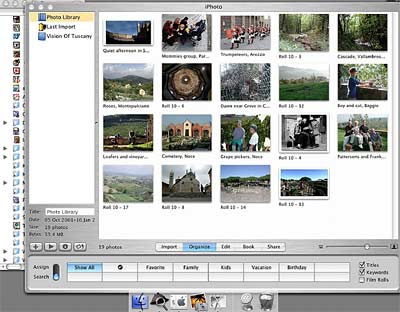
iPhoto sounded great enough to make me buy OS-X and download the freebie immediately.
Not only did I cope with learning OS-X with its impatiently dancing icons but tending to iPhoto as well. Here are some of my experiences.
Import: iPhoto preferences can be defaulted to open and download automatically whenever a digital camera is connected via a USB cable. This works like a charm and the images show up in iPhoto's Library section after a languid download.
The Library is where all downloaded images reside and their identified by Roll number and Image number: i.e., Roll 1, Image 6. Fine for fundamental downloading but what happens when we've downloaded for the 200th time?
Mr. Jobs said never have to mess with complicated digital names again (to paraphrase) but what's more complicated than Roll 4782-Image 21? Renaming and adding keywords is still going to be an iPhoto chore.
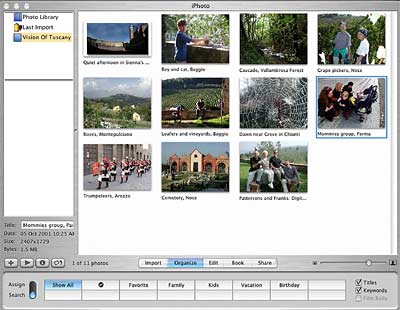
Once images are downloaded, they can be drag/dropped to Albums and rearranged in the Organize section. The original image remains in the Library but renaming it in an album also renames it in the Library. Confusion. If an image is deleted from the Library, it is automatically deleted from all Albums.
In the Edit section, iPhoto offers the opportunity to Rotate (in 90 degree increments) an image, scale (to several pre-set formats plus unconstrained), crop, correct red-eye, and transform to black and white. Badly needed is a way to darken, lighten, and adjust contrast but then, we're talking about Photoshop.
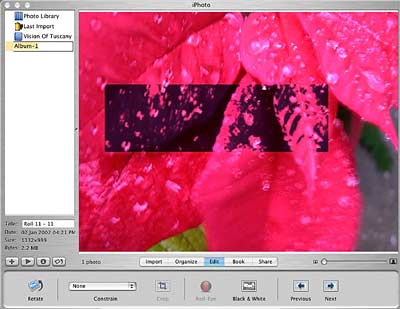
Correcting red-eye works by changing the red area to an eggplant color but the red must be a bright red. Further, this tool will change any red color to the eggplant color as you can see from the poinsettias above. Argh!
Next week, we'll examine making a book with iPhoto and the many ways to share images in the Share pane.
 Jim
Patterson was a respected, trusted resource for anything
to do with digital imaging and a regular digital photo
columnist for Mac Design Magazine and contributor to
Photoshop User magazine. He passed away the summer of
2004. Jim was frequently-published as a freelance travel
photojournalist, and authored the novel, "The Thirteen." There
was much more to Jim than just a writer, and he was much
more to us than just a friend.
Jim
Patterson was a respected, trusted resource for anything
to do with digital imaging and a regular digital photo
columnist for Mac Design Magazine and contributor to
Photoshop User magazine. He passed away the summer of
2004. Jim was frequently-published as a freelance travel
photojournalist, and authored the novel, "The Thirteen." There
was much more to Jim than just a writer, and he was much
more to us than just a friend.
