

Open a new document 400*75.

Fill the canvas using the gradient tool with a lighter color and a darker color I chose green.

Using the ellipse selection took make a selection like mine.Just make a circle out side of the document with some of it going in the document.

In this selection using your same colors fill it with the same gradient just the colors on the opposite sides like mine.

Keep the selection still and go select > modify > contract with a setting of 5 this make your selection smaller. Then fill it with a different gradient i chose #CCCCCC and #F1F1F1 for mine which is a nice silver.

Add in your logo to the silver part.

Add in your company name
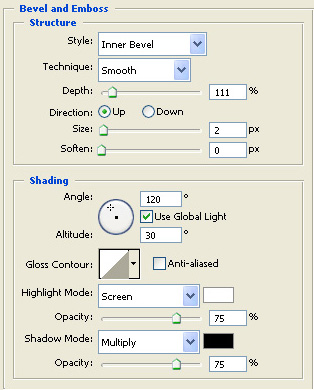
This gives the company name some life.

You can add your tag line here and your done or continue through the tutorial to find out how to animate your banner.
Animation
For my animation I'm going to have some flashing words about the site so I'll start with the word media I chose white.
After you have your word duplicate the word by pressing ctrl + j

hide your first text layer (Media) Now on your duplicate layer go filter > blur > motion blur with a setting of 11. It will ask you if you want to rasterize the layer click yes.

Now i do the same thing in the last step but with new word make sure each word and its blur are on different layers.





Now that you have all your text layers lets animate it.
Go windows > animation.

This will bring up your animation pallet it will show your frames.
Hide all of your text layers except the first (media)
then on your animation pallet click the new frame button 18.jpg
It will ad a new frame in your animation pallet tool now hide (media) and unhide (media blur) then add a new animation and hide the blur and unhide the next text layer etc. When you are through click the play button and watch your animation I got this.

Saving Animation
File > Save for Web, because you don't get all the nifty image sizing and optimization controls right there. Nay, you have to do all these ahead of time. But at least saving the animation is just a one-step process.
