Things You Need:
- Vector Burst Brush Pack (click to download)
- Vector Hot Babes Custom Shapes (click to download)
- Vector Palm Tree Brush Pack (click to download)
- Alba Super Font (click to download)
- Marcelle Script Font (click to download)
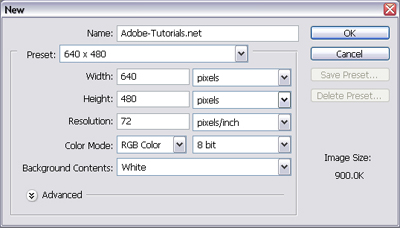
Step 1: New DocumentOpen up Photoshop and make a new document using the settings below:
Step 2: Background Color and Vector BurstI selected the 'Paint Bucket Tool' and painted the background using the color: "#35dd42". Then in a new layer, I got out my 'Vector Burst Brush' and selected the one I liked and made 1 burst using the color: "#46cff1".
Step 3: Adding The "Hot Babes"
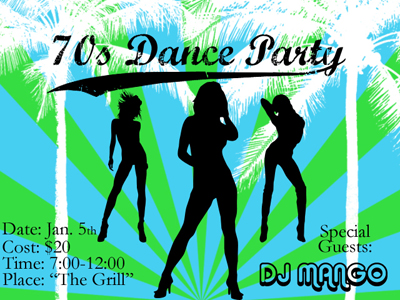
Now take out your 'Hot Babes Custom Shapes' and draw 1 in the middle of the invitation (make it fairly large). Now make 1 more on each side of the middle one. You should now have 3 Hot Babes! I used black for each of my Hot Babes.
Step 4: Adding The Palm TreesNow take out your 'Palm Tree Brushes' and make 2 white Palm Trees in a new layer. Drag that layer behind the Hot Babes but in front of the Background and Burst.
Step 5: Adding The TextNow add whatever text you want. I placed the Part Information on the bottom left side, the Special Guests on the bottom right, and the Main Title: "70's Dance Party" in the top center. Make each of these texts in different layers and move them above everything else. The font I used for the Party Information and Special Guests was 'Garamond', the font I used for DJ Mango was 'Alba Super', and the font I used for the Main Title was 'Marcelle Script'. Once you've done all that you're done! Your final product should look something like this: