


To make your links flip vertically when you go over them, copy the code below and change #000000 to your preference.
| <STYLE type=text/css>A:link {
FONT-WEIGHT: bold; COLOR: #000000; TEXT-DECORATION: none } A:visited { FONT-WEIGHT: bold; COLOR: #000000; TEXT-DECORATION: none } A:active { FONT-WEIGHT: bold; FILTER: flipv; COLOR: #000000; HEIGHT: 0px; TEXT-DECORATION: none } A:hover { FONT-WEIGHT: bold; FILTER: flipv; COLOR: #000000; HEIGHT: 0px; TEXT-DECORATION: none } </style> |

Result
To make your links glow when you go over them, copy the code below:
| <STYLE type=text/css>A:link {
FONT-WEIGHT: bold; COLOR: #000000; TEXT-DECORATION: none } A:visited { FONT-WEIGHT: bold; COLOR: #000000; TEXT-DECORATION: none } A:active { FONT-WEIGHT: bold; filter:glow(color=#000000,strength=2); COLOR: #000000; HEIGHT: 0px; TEXT-DECORATION: none } A:hover { FONT-WEIGHT: bold; glow(color=#00ff00,strength=2); COLOR: #000000; HEIGHT: 0px; TEXT-DECORATION: none } </style> |
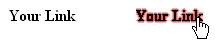
Result
To add a wave effect to your links when you go over them, copy the code below:
| <STYLE
type=text/css>A:link { FONT-WEIGHT: bold; COLOR: #000000; TEXT-DECORATION: none } A:visited { FONT-WEIGHT: bold; COLOR: #000000; TEXT-DECORATION: none } A:active { FONT-WEIGHT: bold; filter: wave(add=0, freq=1, lightstrength=20, phase=10, strength=10); COLOR: #000000; HEIGHT: 0px; TEXT-DECORATION: none } A:hover { FONT-WEIGHT: bold; filter: wave(add=0, freq=1, lightstrength=20, phase=10, strength=10); COLOR: #000000; HEIGHT: 0px; TEXT-DECORATION: none } </style> |

Result
