

Step 1. In this tutorial we are going to manipulate a picture using layer styles and other pictures.
Open a picture of an eye. I chosed one from Http://www.sxc.hu ( a really great stock website ).
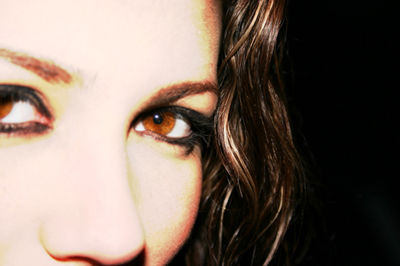
Step 2. One of the esential parts of a manipulation is changing the color into an more abstract one. To do this go to Image>Adjustmens>Color balance and add the folowing settings :
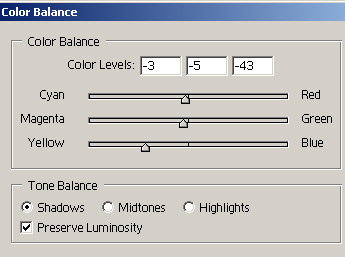
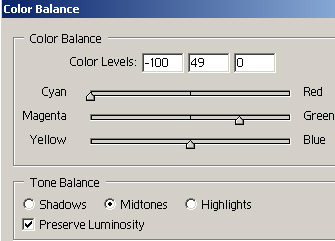
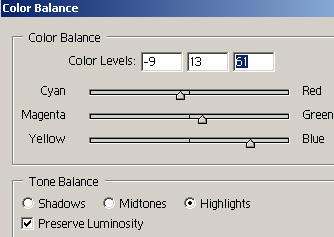
Step 3. Next we are going to change the color of the eye. So grab the round marquee tool , make a selection of the eye and on a new layer fill the selection with any color and change blending mode to color.
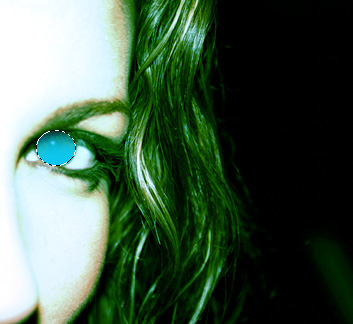
Step 4. Now here starts the fun. We are going to use 3d abstract renders. I got mine from http://www.thedesignworld.com . Here is the way that you use them: Copy them into a new layer on this manipulation and shrink them to match perfectly with the size of the image. Then take a soft Eraser and erase the parts that are covering the face.
This is what you should have:
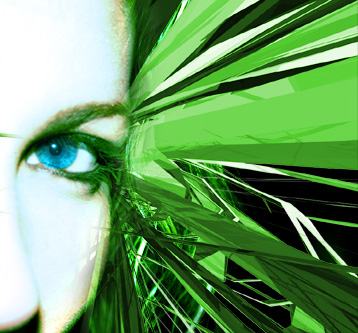
Step 5. Now take another render shrink it place it on the face and change blending mode to Overlay. Then erase the parts covering the other render.
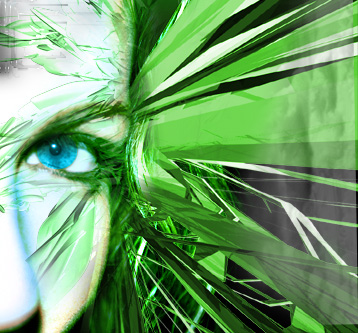
You are done, but actually when manipulating a picture you cant really say that.
