1. Make a new image, ours is 400 x 400 - with a white background
2. Fill the background with Black[ we used #000000]
3. On the same layer, click Filter > Render > Lens flair - leave it on default settings, but place it near the top left hadn side of the image

5. Once again, do it, but this time place it on the top right hand side
6. And again, but on the bottom right hand side - then on the bottom left, then in the approximate middle!

7. Once completed, click filter > sketch > chrome - and give it default settings
8. Hold CTRL and press U, and give it the following settings...
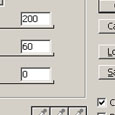
9. Duplicate that layer
10. Set the blending options to overlay.