Step 1: Create a new document with 350 x 150 px and fill the background with (#f2f0f0) color.
Now using the Text Tool write the company name or the name of your website like I have.
The first part with black (#000000) and the second part with white (#FFFFFF).

Step 2: Now using the rounded rectangle tool make a rectangle such that it covers the second half of the text in white.

Step 3: Place the text layer above the shape 1 layer or the layer of the rectangle.
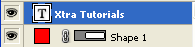
So that you get this:

Step 4: Go to the blending options of shape 1 and add the following:
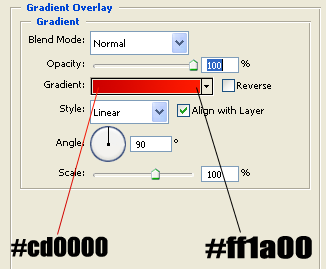
After adding the gradient you should get your final result: