
A common scenario for any Photographer or designer is presenting a batch of images from a photoshoot to a client to pick out the best shots to be used in the design material. This is fine when you are sat at a computer screen with Adobe Bridge sorting through the pictures, but often the photos need printing out onto paper to display at meetings etc. You would imagine this to be a labourous task; opening up each photograph, resizing it onto a new document, typing out the filename… but not with Photoshop's built in Contact Sheet generator…
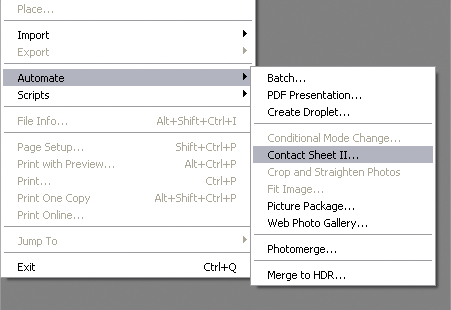
You can quickly and easily generate a single or multi-page preview of a large batch of images in a grid style layout; Open up Photoshop and go to File > Automate > Contact Sheet II
(I'm still a CS2 user so maybe there is an updated version in there for CS3 users?)
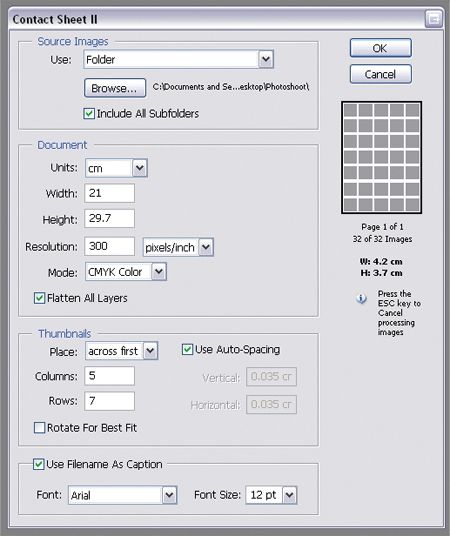
This opens up the options panel where you can specify the dimensions and layout of the images.
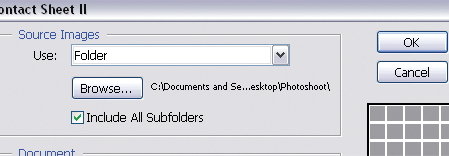
At the very top is the Source Images option box, select either your opened files or images from a directory on your computer, including sub-folders enables the processing of a large number of images.
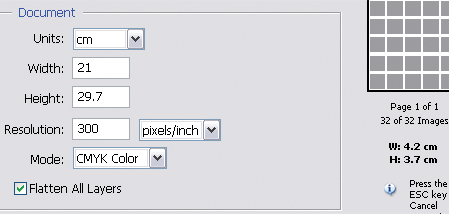
Next up is the Document Setup, enter the size of document you wish to print onto. Here I've set the size to A4 at 300dpi.
Selecting the option to Flatten All Layers will help keep your RAM usage down, deselecting this will keep each thumbnail and title on a separate layer for additional editing.
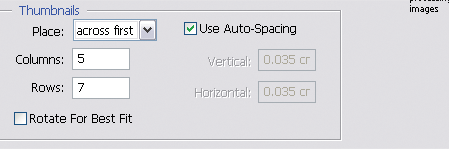
Adjust the options for the Thumbnails, use your Maths head to calculate how many rows and columns you will need to fit the bunch of images into your document. If you keep an eye on the preview on the right hand side of the panel it displays an overview of the layout and number of pages as well as the size of each thumbnail allowing you to estimate the optimal sizes.
Rotating for best fit will keep all your images in the same orientation making for a neater layout, but any portrait shots will be the wrong way up.

Finally set the option of adding the document filename as a caption for easy image recognition, choose from a set of basic fonts and set an appropriate size.
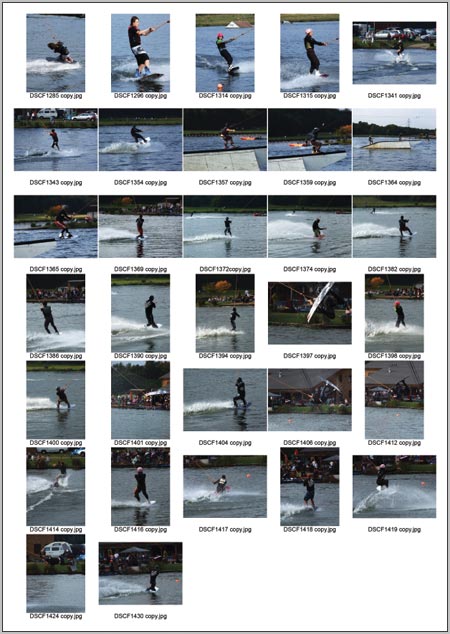
Click Ok and watch Photoshop do it's magic, after a short while all your photographs will be compiled into one (or multiple) thumbnail sheets. Save the files and print them out to present the collection to your client.
