

If you haven't visited Adobe Online recently (or at all), take a new look. You'll need, as always, a working Internet connection and a Web browser.
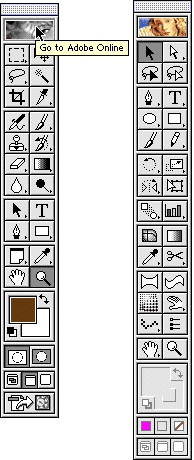
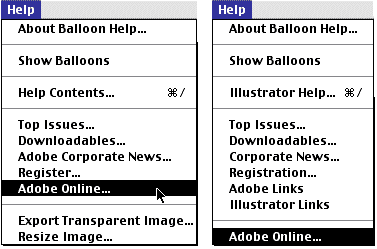
Adobe Online is a fine resource for users of any of Adobe's major products. Both Photoshop and Illustrator access it from a button on top of the Toolbox (as well as from the Help menu).
If it's been a while since you've accessed Adobe Online, you'll need to update. Head to Edit> Preferences> Adobe Online. If you haven't updated recently, here's what you'll see:
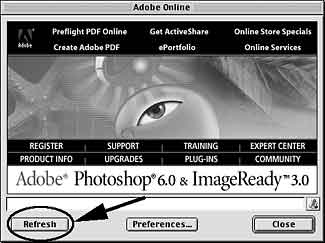
Click the Refresh button.
If your Adobe Online has been updated, you'll see this:
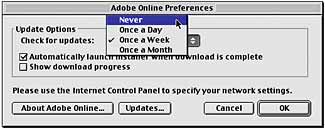
After you've updated to the new Adobe Online, you'll not see the panel shown in Figure 3 (with the Refresh button) again. Rather, clicking Adobe Online's access button in the Tool box or selecting it from the help menu will take you directly to the Web, scooting you along to Photoshop's Adobe Online page.
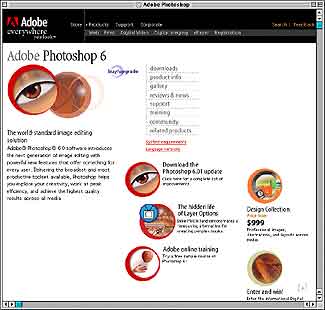
Remember that a working Internet connection is required (as always).
There's nothing at Adobe Online that you can't reach through Adobe's home page (www.adobe.com), but this does make things much more convenient.
Across the top of the page, you'll find links to other major parts of the Adobe Web site. Here are the key sections of Photoshop's Adobe Online:
DOWNLOADS
You'll find the latest updates to Photoshop (and the demo download).
PRODUCT INFO
This is primarily aimed at shoppers. The system requirements, features, and overview are typical of th content.
GALLERY
The Gallery is, as you would expect, some of the top Photoshop creations and art. Inspiring! You'll also find a link to Photoshop Features. Rather than a list of what the program can do, you'll find more incredible Photoshop work.
REVIEWS & NEWS
More sales related stuff, but you may want to check the listing of Events and scope out the Press Releases.
SUPPORT
The two key links here are Customer Support and User Forums (described below).
TRAINING
You'll find tutorials, a link to the Photoshop Expert Center, and links to training resources, too.
COMMUNITY
Another link to the User forums, as well as more resource links.
RELATED PRODUCTS
There are links to both additional Adobe products and to third-party plug-ins. While not a comprehensive collection of plug-ins, the big names are there, as well as some hard-to-find plug-ins.
The Support area of the Adobe Web site contains several types of resources:
DOWNLOAD FREE PLUG-INS AND UPDATES
When Adobe releases incremental improvements to Photoshop (such as the update from 6.0 to 6.0.1), here's where you can find them.
TOP ISSUES
The most frequently asked questions are addressed. You may want to add this link to your bookmarks or favorites. It's updated regularly.
SEARCH SUPPORT DATABASE
This is the Mothership of Photoshop information. The Adobe Technical Support team members go to the Support Knowledgebase for answers.
ADOBE USER TO USER FORUMS
The User Forums are electronic bulletin boards where Adobe customers can post messages. Ask questions, give answers, share opinions. Adobe offers forums for each of its major products, and many have separate forums for Macintosh and Windows users. You can access the User Forums from either Adobe Online or from www.adobe.com/support/forums/main.html
(Go to Adobe's home page, click on Support, click on User to User Forums.) You'll find a list of all the Adobe product forums.
TECHNICAL SUPPORT
Adobe offers complimentary telephone support for a limited time after purchasing or upgrading Photoshop (you pay for the long distance charges). For a first-time Photoshop purchase, you currently get 90 days of support from the date of your first call. For upgrades, Adobe offers 30 days of complimentary support, also from the date of the first call. After the complimentary support period, you can received telephone assistance charged on a per-minute basis (using a 900 number), a per-incident basis, or you can subscribe to an annual support program. You can also link to ePeople.com for e-mail based technical support from independent professionals.
TECHNICAL GUIDES
A wide variety of subjects are covered, some generally, some progra-specific.
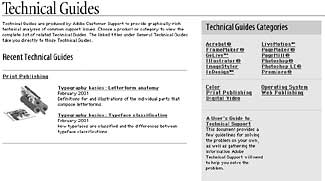
One important Technical Guide is "A User's Guide to Technical Support." This document explains what to do before you call Adobe Tech Support, what number to call, and explains the free support options. The section entitled "Before You Call" often is enough to solve the problem. You'll find it at: adobe.com
 Pete
Bauer is the Help Desk Director for NAPP, as well
as a Contributing Writer for Photoshop User and Mac Design
magazines. His books include "Special Edition Using
Adobe Photoshop 7" (with Jeff Foster), "Special
Edition Using Adobe Illustrator 10," "Sams Teach
Yourself Adobe Illustrator 10 in 24 Hours" (with Mordy
Golding), and "Special Edition Using Adobe Illustrator
9." Pete writes documentation for a variety of computer
graphics related products, as well as testing software
for a number of companies. As a computer graphics efficiency
consultant, Pete specializes in customized training programs.
He is based in Columbus, Ohio, and can be contacted via
Pete
Bauer is the Help Desk Director for NAPP, as well
as a Contributing Writer for Photoshop User and Mac Design
magazines. His books include "Special Edition Using
Adobe Photoshop 7" (with Jeff Foster), "Special
Edition Using Adobe Illustrator 10," "Sams Teach
Yourself Adobe Illustrator 10 in 24 Hours" (with Mordy
Golding), and "Special Edition Using Adobe Illustrator
9." Pete writes documentation for a variety of computer
graphics related products, as well as testing software
for a number of companies. As a computer graphics efficiency
consultant, Pete specializes in customized training programs.
He is based in Columbus, Ohio, and can be contacted via
