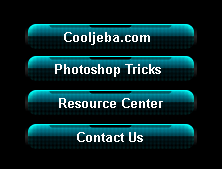
Step 1: Start with a large black canvas, in your layers window make a new layer set. Name it Aqua style tabs.
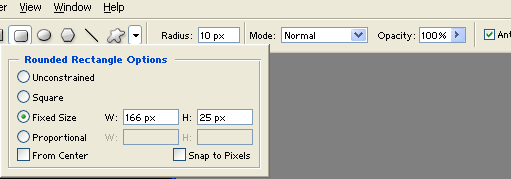
Create a new layer then draw a 166 x 25 pixels, #005393 rounded rectangle using your your rounded rectangle tool. Use the fixed size setting under rectangle options to make the exact rectangle.
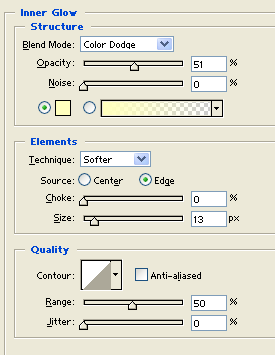
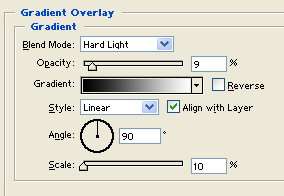
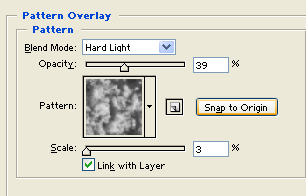
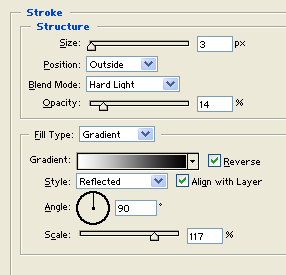
Add the following layer styles:
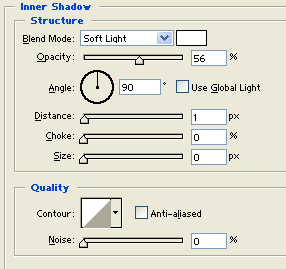

Step 2: In a new layer draw a 1000 x 5 pixels, #C6ACE2 thick line across your canvas. Use your rectangle tool to make the rectangle so you can use the fixed size setting under rectangle options to make the exact line.
Add the following layer styles:

Step 3: Just on the center of your tab, in a new layer draw a small 43 x 7 pixels, white rounded rectangle.
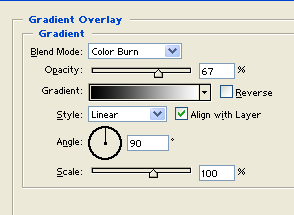
Add a gradient overlay layer style:
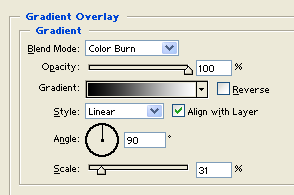

Step 4: Duplicate your small rounded rectangle layer twice and position them on the left and right of the original shape. Set the copies opacity level to 48%.

Final Image: Aqua Style Tabs.