


Preparations:
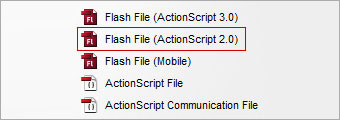
Create a new flash file (ActionScript 2.0) and save it as test.fla in this case.
Step 1:
Draw a rectangular outline then press F8 and convert it to a Movie Clip symbol. Give its instance name as "mc_border".

Step 2:
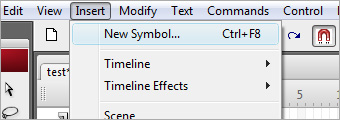
Go to Insert > New Symbol and create a new Movie Clip symbol. Name it as "mc_container". Do not do anything with it and exit back to Stage.
Step 3:
Open up your library and drag mc_container to the center of mc_border.

Step 4:
Draw a circle on the Stage then press F8 and convert it to a Button Symbol.

Step 5:
Create a layer on the timeline and call it as "actions".
Right-click on the first frame of actions layer and select Actions to activate the panel.
Insert these codes into the scripting window.
| space = 10;
speed = 4; my_mc._alpha = 0; MovieClip.prototype.loadPhoto = function(photo){ my_mc._alpha = 0; this.loadMovie(photo); _level0.onEnterFrame = function(){ var total = Math.round(my_mc.getBytesTotal()/1024); var loaded = Math.round(my_mc.getBytesLoaded()/1024); if (total != 0 && loaded>=total){ var w = my_mc._width + space; var h = my_mc._height + space; border.resize(w, h); delete this.onEnterFrame; } } } MovieClip.prototype.resize = function(w, h){ this.onEnterFrame = function(){ this._width += (w - this._width)/speed; this._height += (h - this._height)/speed; if( Math.abs(this._width-w)<1 && Math.abs(this._height-h)<1){ this._width = w; this._height = h; my_mc._x = this._x - this._width/2 + space/2; my_mc._y = this._y - this._height/2 + space/2; my_mc._alpha = 100; delete this.onEnterFrame; } } } |
Step 6:
Right-click on the button you have created and select Actions. Insert these codes into the scripting window. Hope you enjoyed the session.
| on(press){
my_mc.loadPhoto("img1.jpg"); } //You may replace img1.jpg with the filename of your image //as long as it is in the same folder as your test.SWF |
 10Steps is a huge resource of Photoshop tutorials, freebies and inspiration for designers.
