

The old film effect has now become popular for Flash artists to put in their animation as a Flash back to past memories or pretending to watch an old film. Either way, this tutorial will teach you how to create this effect to put for your animation or as a image effect.
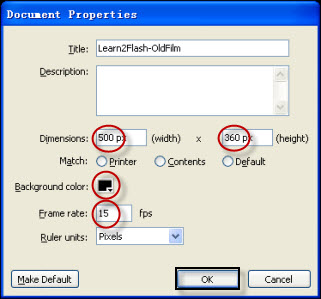
Step 1. Create New File (Note: Actionscript 2.0 only) and change the properties shown in the image below:
Step 2. Copy and Import the following Tom and Jerry picture if you like or get your own picture which is about 300px by 225 px. (It will be best if you get a black and white picture or an image from an old film).
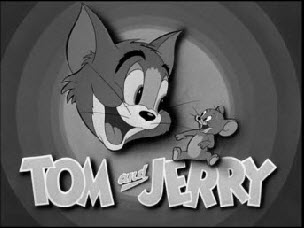
Step 3. Ok, after you have imported the picture to the library by: File>Import>Import to Library, you will need to create an empty movie clip by: Insert>New Symbol (Ctrl+F8). Name it anything you like and press Enter.
Step 4. Now you will be inside your symbol (AHH it's all black!!) but dont worry, just drag the Tom and Jerry (or the picture you've imported into the library) to the stage. (Note: If the Library Panel is not opened, simply go to Windows>Library (Ctrl+L).
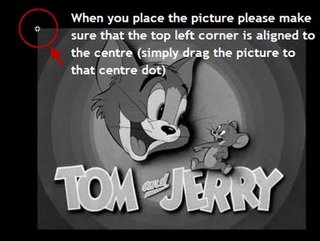
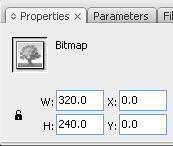
Step 5. Select your image and adjust the size and position of your image by inputting the following into your properties panel: (PS the width and height does not have to be exactly the same but something close would be fine).
Step 6. Go back to scene one by clicking on it at the top:

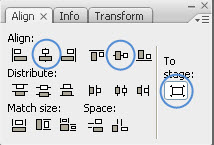
Step 7. Once you are at scene1, drag the movie clip you were just in from the library to the stage. Then you will need to centre the image by using the Align Panel. Windows>Align (Ctrl+K).
Click you image and align it to the centre of the stage:
Step 8. Now right click on your image and select Actions (F9) to open up an actions panel and copy and paste the folowing code:
|
onClipEvent (enterFrame) { this._x = Math.random()*2+90; this._y = Math.random()*2+60; this._alpha = Math.random()*30+50; } |
Now you're done!! Test your movie now!!
