At first, let's search for a suitable image (it this tutorial I will not describe how to make an impress). You can make an impress by yourself or to find in the Internet (try to search in Google-Images). I found this one:

Now, let's turn it to a real stamp impress.
To do that, go to Filter - Filter Gallery … and then:
Graphic pen - Stroke Length: 15
Light/Dark balance: 98
Stroke direction-Vertical
another option: Paint Daubs (in Filter Gallery) -
Brush Size: 3
Sharpness: 3
Brush Type: Simple.
To make a paper effect search deviantart.com for dirt textures, and then apply the texture you have chosen by placing it over the seal and setting the blending options to Screen.
Tips: You can apply an unsharp mask on the final image after grouping all the layers, and you can also use the Eraser tool to make it look more realistic. That's all!
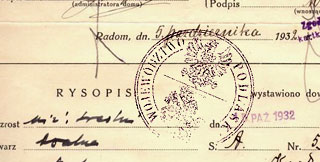
P.S. You can also search the net for a document /envelope stock images to apply it on. See the result above.