Step 1:
Start this tutorial off by making a new document in photoshop sized about 380 x 100 pixels, a nice forum signature size.
Reset your colors to black and white by pressing D on your keyboard. Now apply Filter > Render > Clouds on the background layer.

Step 2:
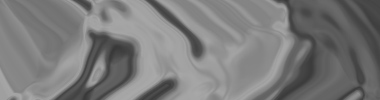
After applying Clouds apply Filter > Sketch > Chrome, then Filter > Distort > Wave using the default settings with both.
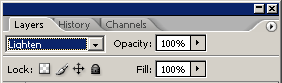
Change the layer mode for this layer to Lighten to get a cool effect.

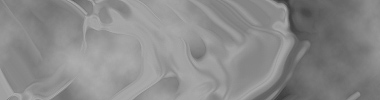
Merge your layers together (ctrl+e) then apply Filter > Sharpen > Sharpen once.
Step 3:
After you merged your layers together you should be left with just one, so duplicate that layer then apply Filter > Blur > Gaussian Blur with a radius of about 2.0.
After applying Gaussian Blur, change the layer mode for your blurred layer to Overlay and leave the opacity at 100%.

That will have given it a nice bright glow.
Step 4:
Create a new Gradient Map Adjustment Layer (Layer > New Adjustment Layer > Gradient Map) and use the following settings:
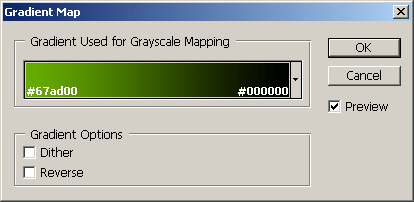
Your image will now look something like this:

Now change the layer mode for the Gradient Map layer to Color.

Duplicate your Gradient Map layer then change the layer mode to Overlay and lower the opacity to 40-50%.

Step 5:
Again with the adjustment layers, add in a Color Balance layer by going to Layer > New Adjustment Layer > Color Balance, use the following settings:
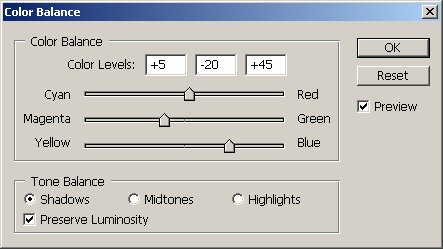
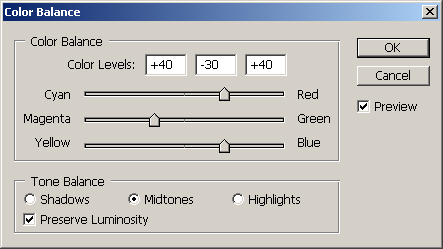
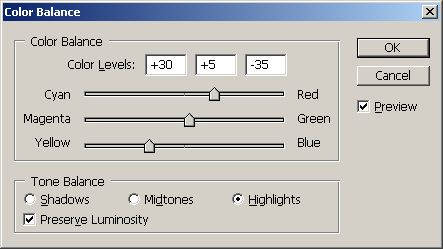
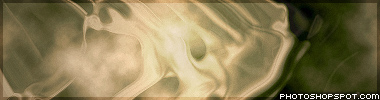
Now you should have some nice colors like this:

Step 6:
Now you might want to repeat the part where you merge the layers, then duplicate, blur, layer mode change etc, so you get more of a vibrant picture.

Lastly you might want to add a soft border, and of course text.
Thanks for reading.