Note: This tutorial is done by Adobe Photoshop 7.0
1. Open a new window with:
Width:120pixels
Height:120pixels
Resolution: 72 pixels/inch
Mode: RGB color
Contents:White
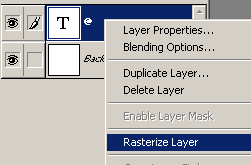
2. Type a big letter inside, in my case I have typed "at" sign with Caflisch Script font with a size of 200pixels. Next rasterize the type layer by right clicking and choosing Rasterize Layer

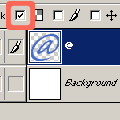
3. Tick the Lock Transparent Pixels
4. Select Airbrush Tool (J)
 and don't forget to change the foreground color to something different. Now paint on the letter. As you see it paints only the letter and not the sides of it... cool huh?