 1. Create a new 250x250 image or and image you would like to place pixelated
text one. Here I am using a rendered cloud effect.(Foreground: #C22E00;
Background: #FFDE00)
1. Create a new 250x250 image or and image you would like to place pixelated
text one. Here I am using a rendered cloud effect.(Foreground: #C22E00;
Background: #FFDE00)
 2. Create your text. Duplicate the text layer. Move the duplicated layer
under the original. Now go to Filter > Blur > Gaussian Blur and
choose a radius of 4 pixels.
2. Create your text. Duplicate the text layer. Move the duplicated layer
under the original. Now go to Filter > Blur > Gaussian Blur and
choose a radius of 4 pixels.
 3. Next go to Filter > Pixelate > Mosaic. Cell Size: 14. Now add
a nice drop shadow and you're done.
3. Next go to Filter > Pixelate > Mosaic. Cell Size: 14. Now add
a nice drop shadow and you're done.
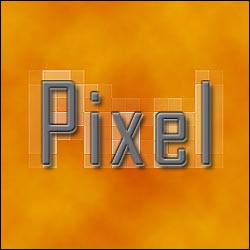
4. Here is my final image after adding a bevel and color overlay.