


3 Pixel Border
This is the easiest way to create a 3 pixel border!
1. Open up your picture, we just used a black image, with a white background
2. Hit CTRL + A or get marquee tool to select all the image
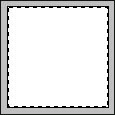
Use marquee tool
3. Click Edit > Stroke - and give it these settings:
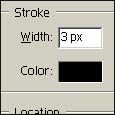
Stroke settings
4. Again click Edit > Stroke - but this time use the color white, and only use a stroke of 2px
5. Last time, click Edit > Stroke - settings are only 1px with #000000 (Black)
6. Thats it, hold CTRL and press D to deselect it

Final result
Even though it looks like the outside pixel is too thick, its really not, its just like there anyway, it will go when you save it
