

Step 1:
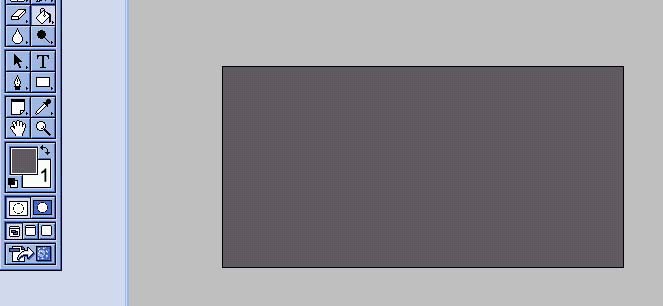
First have a dark back ground like in pic 1. And make sure the
foreground color (1) is a light color, preferable white.
Step 2:
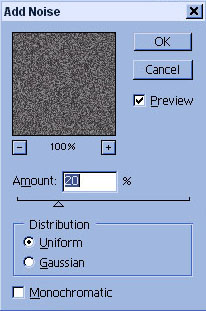
Go to Filter>Noise>Add Noise and
place setting like in pic 2.
Step 3:
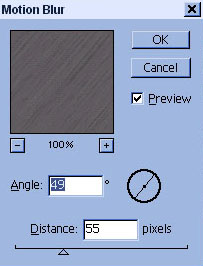
Go to Filter>Blur>Motion Blur and
place setting like in the pic
below. You can make these have different
setting depends on how you
want the texture to look.
Step 4:
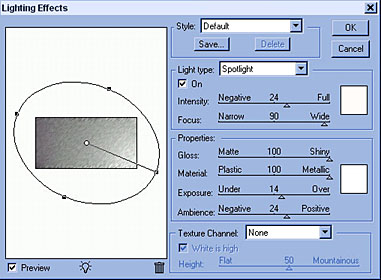
Lastly, go to Filter>Render>Lighting
Effects and place settings
like the pic below. This part will depend
on the size of the image, I
was using an image thats 400x200. Place
the ovel just like I did. And
then make sure to make Gloss & Material
at 100. Raise focus alot.
Just make sure that the rest of the setting
the image looks like the one I have.
This is what I came up with:
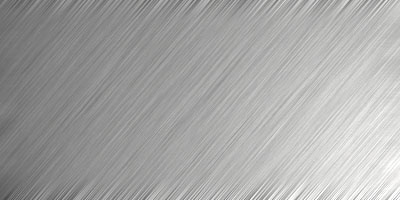
The outcome isn't all that. But what you come with is something great for adding text of making interfaces with.
Remember that since you're making many of these with gradients and such,that means you can add your own changes. Place them at different angles or lenghts, or even different gradients. And don't just make the textures all the same. Choose different techniques so everything doesn't look the same. Enjoy!!
