


1. Create a new file. Select Radial Gradient and draw the circle using Oval Tool with no outline. You will use this button for the next step.

2. Select the button using Arrow Tool and press F8 to create symbol. Select Button option in behavior and name the symbol.
3. Right Click the symbol and select Edit.
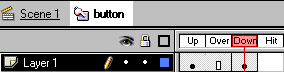
4. You will get four options in the timeline. Right Click on the Down and Insert Keyframe. Keep the symbol selected.
5. Modify > Transform >
Scale & Rotate
Scale - 90%
6. Edit > Edit Movie
7. Control > Test Movie
8. Save the file. Press F12 to preview the movie in the browser.
