

1. You need to draw path for this tutorial.
2. Create a new file.
View > Rulers
View > Grid > Show Grid
View > Grid > Edit Grid (10 X 10 px)
3. Drag the horizontal & vertical guide lines to get the center.
View > Guides > Lock Guides
4. Create two layers. One for static object and one for dynamic.
5. Draw the net on the bottom layer. You can get it from 'Webdings' font. Rightclick on the 25 th frame. Select insert frame to keep the net for 25 frames.
6. Place spider symbol on the 1st frame of the top layer. Select it.
Modify > Group
Rightclick on the 25 th frame. Select insert keyframe.
Move the spider at any place within the net.
Tween the animation.
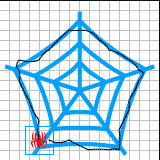
7. Insert > Motion Guide
Draw the path with Pencil Tool.
8. Select the spider layer. Select the 1st frame. Drag the spider to the start of the path.
In the frame options check Orient to path.
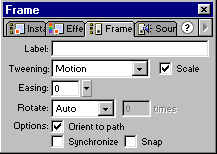
9. Select 25th frame. Drag the spider to the end of the path.
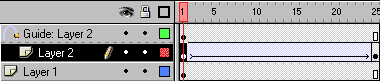
Off the Eye icon in the Guide layer if you do not want to see the path.
10. Save the file.
