

1. You need to make frame by frame animation in this project.
2. Create a new file.
View > Rulers
View > Grid > Show Grid
View > Grid > Edit Grid (10 X 10 px)
3. Drag the horizontal & vertical guide lines to get the center.
View > Guides > Lock Guides
4. Create the artwork as shown and draw three circles for three lights.
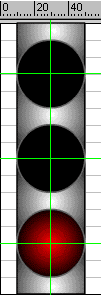
5. Drag the Arrow Tool from 15 to 1 st frame to select the segment.
6. Modify > Frames > Convert to Key frames

7. All the frames will be converted into key frames.
8. Select 1st frame. Deselect the selection in the artwork by pressing Esc key.
9. Fill the bottom circle with red colored gradient using Paint Bucket Tool.
10. Using > key move to the next frame and fill four more frames with red gradient.
11. Follow the same procedure and fill 6 to 10 frames with orange gradient for middle circle and 11 to 15 frames with green gradient for top circle.
12. Save the file.
