To complete this tutorial you will need a photo of person you want to create a silhouette from. In addition, you will need to select the silhouette of this person on white background. I will not describe how to do that in this tutorial. You can easily do that with standard selection tools and by reading photoshop internal help.
Step 1. Please open the file source.png in Photoshop.

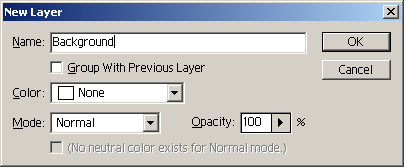
Step 2. Create a blank layer behind the girl image (Layer â?? New-Layer or press Shift+Ctrl+N).and name it â??Backgroundâ??.
Step3. Now select the â??Backgroundâ?? layer and go to Select-All (Ctrl+A). Choose a Paint Bucket Tool (press G) and choose red color â?? check the picture below.
 Click Image to Enlarge |
Now you can click in any place of the image and fill the whole space with red color. Finally, you should get the picture like this:

Step4. Now double click on Layer1 with girl to open Layer Properties.
 Click Image to Enlarge |
Select Drop Shadow checkbox. No need to change any parameters for shadow. You can play with them later. Then select Color Overlay checkbox and then click on Color Overlay item to select a color for this effect.
 Click Image to Enlarge |
Step5. Choose Black color and press OK. You should get such picture:
 Final Result |
You can also open again Layer properties window by double clicking on Layer 1 and select Outer Glow effect. This way you will get the picture below.
 Final Result with Outer Glow Effect |
