Tentacles are easy to do, and have a great effect. First, you must create a new image, any size, and any background colour. Next, in your tools palette to the laft of the screen, select the polygonal lasso tool. Create a new layer by going to layer>>new>>layer, and click OK. Draw a shape similar to below on your new layer, and using any foreground colour, fill in your selection.

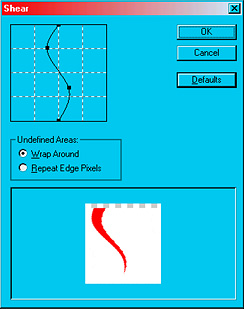
Now go to filter>>distort>>shear, and make your lines look similar to below.
Download this zip file, and unzip it into C:Program FilesAdobePhotoshop 7.0PresetsStyles or something similar to that. Back in Photoshop, go to window>>styles. In the styles window, click on the arrow pointing right in the top right corner. Go to replace styles>>Tentacles.asl. Click on the layer with your tentacle on it. Now hit the tentacle style in the styles palette. Your picture should look like this:

Keep repeating the first few steps until you have as many tentacles as you would like, and then you can add some text, etc... That's it! Here is the finished product: