1. Create a new canvas and add some text. Make sure there are some empty spece underneath the text .

2. Dublicate the text layer and go to Edit > Transform > Flip Vertical. Nudge the new layer below the original text as shown in the image to the right.

3. Rasterize the copied layer, Layer > Rasterize > Type.
Go to Edit > Transform > Perspective. Grap the left handle (1) and drag it out to the left a few pixels while holding down the Shift key. Commit transform

Next go to Edit > Free Transform (Ctrl + T) and move the handle in the middle (2) towards the middle a few pixels. Commit transform.
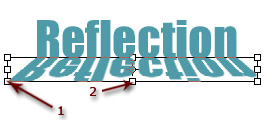
Set the opacity of the layer to about 30%. Now you should have a nice reflection to your text.
