1. start with a new document (ctrl+n). the dimensions of the document aren't important, just make sure you have a black background and that you have enough space at the sides. make white your foreground and black your background color. select your text tool and typ your text, here i used sf fedora, 150 points

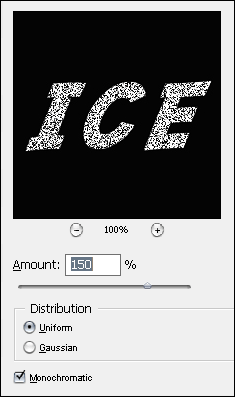
2. hold down ctrl and click on your text layer, this selects your texts and gives you that walking ants selection filter > noise > add noise. photoshop will ask you if you want to rasterize the layer. hit ok and use these settings:
3. filter > pixelate > crystallize and use cell size 3. next, go to filter > stylize > find edges and hit ctrl+i to inverse the colors

4. image > rotate canvas > 90 cw filter > blur > gaussian blur, radius of 1 pixel
filter > stylize > wind method : wind direction : from the right
you could also apply the wind filter a second time (ctrl+f), that should give the best effect in general,
but i wouldn't recommend applying it three times
image > rotate canvas > 90 ccw

5. create a new layer (shift+ctrl+n), select a light blue and fill your new layer (i used #1498fe).
with your new layer still active, hold ctrl and click on your text layer, again you have those walking
ants on your screen.
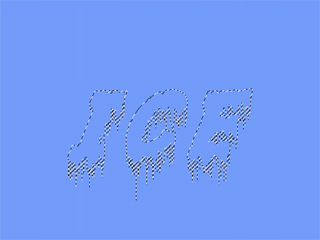
now choose overlay in the layers palette. you should have something similar to mine:

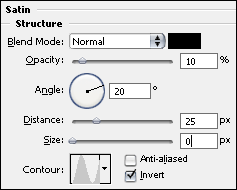
6. select your text layer and go to layer > layer style > satin and use these settings to add some frost to your text: