Yet another background effect that looks so much more realistic and 3d than the other ones!
1. Make a new image, ours is 600 x 600 - with a transparent
2. Grab your Gradient tool (G) and give it the following settings: (Black, white - mode: Difference - Opacity: 100%)
 |
3. Now, drag your gradient from the top left, to the bottom right
 |
4. Next, you need to drag your gradient about... 30 times or so all over your canvas. try not to make the points so close together when you are dragging each one - it will just leave a hard line
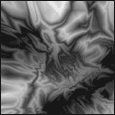
Click to enlarge
|
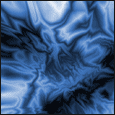
5. Now, click Image > Adjustments > Hue/Saturation. Click the colorize box, and whack the saturation upto 50! Choose whatever colour you like, but personally, blue works best.(215)
 |
6. Now, click Layer > Duplicate layer - and hit ok. Next you need to set the blending options to softlight on the layers palate.
7. Duplicate this new layer, and click Filter > Sketch > Chrome - with the default settings. Finally, you will need to set the blending options to "Color Dodge" on the layers palate
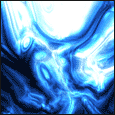
Click to enlarge |
Obviously you rn 't going to want to leave it boring
like this, you might want... to make it into a splash page or a background for
a header: