Open up any image in paint shop pro. I chose this one.

Go to layers>>new raster layer. Now select the fill tool. On the right side of your screen, select gradient as the fill type. Now click on it, and use similar settings to below.
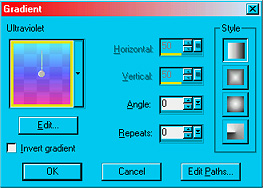
Click OK. Go to layers>>properties, and set the blending mode to overlay, and opacity at 50%.