1. This is a quick, and quite simple tutorial. Now its not html, it uses Javascript. What it does is lets you customize what it says in the status bar usually at the bottom left of your browser. Right now in your browser it should say 'Infinite Designs.org ....'. Here's how to make it do that.
Within the tags of your website put the following:Ã????Ã???Ã??Ã?Â
But what if your websurfer doesn't have a web browser that doesn't support javascript, so it displays the script as text? To prevent that, you can simply add around the code in the script like so:
| |
2. Now what if you want the status bar to display information when people rollover your links. Here's an easy trick how to. First, either in the
tags or in the tags add your status bar code, but make it a function{ } like so:| |
(note: I didn't put my javascript in the header tags, that's why are added.)
The msg || ' '; basically means, the status bar will display the contents of the variable msg, if there aren't any contents it just displays a space (seems link nothing).
3. Now we must
add some code to your links telling them to activate the
functions we declared in the javascript.
| My
First Link My Second Link |
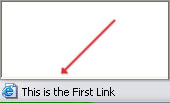 Ok so what does all of this do. Well the onMouse.. code is javascript which
I added to the already existing links. So onMouseOver, means when the mouse
rolls over the link, it then activates the function we made called 'linkmessage',
and the value in the brackets is the message it sends to the 'linkmessage'
function. onMouseOut detects when the mouse rolls off a link, therefore
it removes the status bar message, replacing it with a blank space. Now
return true; was added because your browsers default is to display the path
of the link in the status bar. Instead now, return true; tells it to listen
to the onMouseOver command. So now your links should work like the following.
Ok so what does all of this do. Well the onMouse.. code is javascript which
I added to the already existing links. So onMouseOver, means when the mouse
rolls over the link, it then activates the function we made called 'linkmessage',
and the value in the brackets is the message it sends to the 'linkmessage'
function. onMouseOut detects when the mouse rolls off a link, therefore
it removes the status bar message, replacing it with a blank space. Now
return true; was added because your browsers default is to display the path
of the link in the status bar. Instead now, return true; tells it to listen
to the onMouseOver command. So now your links should work like the following.My First Link
My Second Link
