

The Sketch filters in Adobe Photoshop are black and white and doesn't give you the option to do it in colour. In this tutorial, you will learn how to apply sketch filters in colour by applying it to each channel individually.
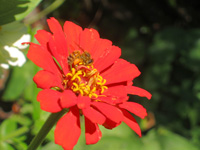 |
1. Open the image for editing. |
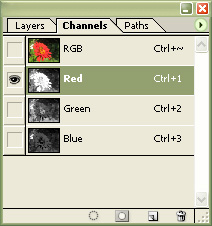 |
2. In the channels pallet, select the "Red" channel (Ctrl+1) |
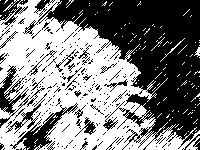 |
3. Apply the sketch filter (Filters> Sketch) of your choice. |
|
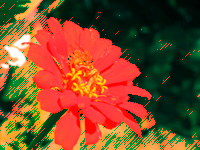
4. Repeat steps 2 and 3 for the "Green" and "Blue" channels. Try applying the filter to only one or two of the three channels to generate a different effect. Rollover the image on the left of this step to see the original image before this technique was applied. |
Sketch filters is a great way to add an artistic effect to photographs. By applying the filter to each channel, a colour version of the filter is created.
